Test Management and Collaboration
- Test management is a key part of software quality assurance that helps organize, execute, and report on testing activities. Effective test management not only improves product quality but also enhances collaboration among team members. Test management tools streamline this process by offering functionalities to manage test cases, track defects, monitor progress, and integrate with other development tools.
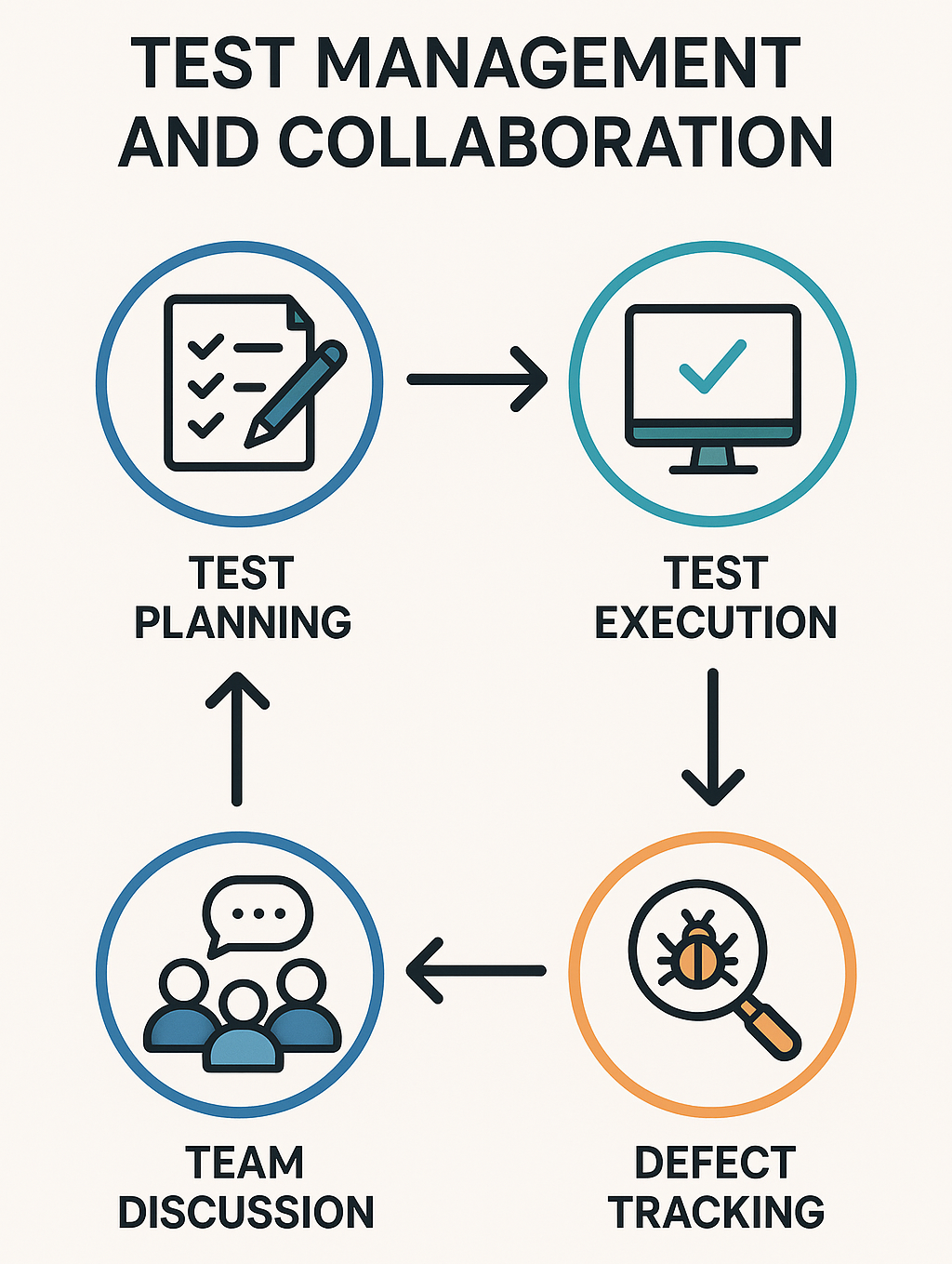
Key Aspects of Test Management and Collaboration
Centralized Test Case Management
-
Allows teams to create, manage, and organize test cases in a central repository.
-
Ensures that all test cases are up-to-date, accessible, and versioned.
-
Teams can track the history of test cases, revisions, and approvals to keep the test suite relevant.
Test Execution and Scheduling
-
Teams can plan test runs by scheduling test executions based on releases, sprints, or build cycles.
-
Test management tools often allow configuration of tests to be executed on specific environments or devices.
-
Reporting on the success and failure of test cases helps measure test coverage.
Defect and Bug Tracking
-
A good test management tool integrates with bug tracking tools like JIRA, Azure DevOps, or GitHub.
-
Defects found during testing can be directly logged into the bug tracking tool, linking them to the specific test case and build.
-
This connection provides traceability, allowing teams to track which issues are related to which features or test cases.
Collaborative Workflows
-
Many test management tools support role-based access, allowing team members to manage permissions according to their roles.
-
Team members can comment, tag others, and receive notifications for updates or issues.
-
Some tools also offer dashboards and activity feeds to keep everyone aligned.
Automated Test Integration
-
Test management tools can integrate with CI / CD pipelines to automatically run tests and pull results. Automated tests, usually written in tools like Selenium, Cypress, or Postman, can be executed through the test management tool.
-
This enables continuous testing, providing feedback on code changes.
Reporting and Analytics
-
Reporting features are essential for tracking the progress of testing, analyzing test results, and making informed decisions.
-
Dashboards and visualizations such as pass / fail charts and burn-down charts help stakeholders monitor release readiness.
-
Reports can be customized and shared to meet specific audience needs, such as detailed reports for QA teams or summary reports for executives.
Test Management Tools
JIRA with Xray or Zephyr
-
Xray and Zephyr integrates directly with JIRA for bug tracking.
-
Supports test case management, test planning, execution, and reporting.
-
Allows test automation integration with CI / CD pipelines.
-
Offer APIs and integrations for tools like Jenkins, Bamboo, and Selenium.
TestRail
-
TestRail is a centralized dashboard for test case management, execution, and reporting.
-
Customizable reports and integrations with CI tools.
-
Integrates with bug trackers like JIRA, GitHub, and others.
-
Allows scheduling of test runs and tracking historical test results.
PractiTest
-
PractiTest offers a two-way JIRA integration for managing test cases and tracking issues.
-
Supports both manual and automated test management, including integration with Selenium, Jenkins, and JUnit.
-
Advanced reporting features, including traceability reports and dashboard visualizations.
qTest
-
qTest is known for its collaboration features and compatibility with Agile frameworks.
-
Offers robust integration with test automation tools like Selenium and Postman.
-
Integrates with JIRA for tracking issues and traceability.
-
Allows linking test cases to requirements, builds, and test runs for a comprehensive view of testing.
Azure DevOps
-
Azure DevOps provides integrated tools for requirements tracking, testing, and release management.
-
Supports both manual and automated test management.
-
Tight integration with the Azure ecosystem and CI / CD pipelines. Ideal for teams using the Microsoft ecosystem, as it offers seamless collaboration with the Azure cloud environment.
Best Practices for Test Management and Collaboration
Define a Test Plan and Scope
- Before creating test cases, define a test plan that includes objectives, scope, resources, and timelines.
-
Align with Business Goals
-
Understand the project’s purpose and how quality impacts the end-user and stakeholders.
-
Make sure the testing goals are directly tied to the product’s success criteria.
-
-
Define Clear Objectives
-
What are you testing? ie: Functionality, Usability, or Performance?
-
What are the success / failure criteria?
-
-
Identify Scope (In-Scope and Out-of-Scope Items)
-
In-Scope - Are features, components, or integrations that will be tested.
-
Out-of-Scope - Are excluded features not ready, already tested, or not relevant—this avoids scope creep.
-
-
Specify Test Deliverables
-
Test Plan document
-
Test cases / scripts
-
Test data
-
Test summary and defect reports
-
-
Set Roles and Responsibilities
-
Who writes test cases?
-
Who executes them?
-
Who logs and verifies defects?
-
-
Choose the Right Test Types
-
Unit, Integration, System, UAT, Regression, or Smoke.
-
Prioritize based on risk and impact.
-
-
Establish Entry and Exit Criteria
-
Entry - Conditions to begin testing. ie: Code freeze, Environment ready.
-
Exit - Conditions to stop testing. ie: % Test coverage, Critical bugs fixed.
-
-
Define Test Environment and Tools
- Specify hardware, software, browsers, and tools needed. ie: JIRA, TestRail, Selenium, Postman.
-
Create a Realistic Test Schedule
-
Map test activities to the project timeline.
-
Include buffer time for retesting and regression testing.
-
-
Plan for Risk Management
-
Identify potential risks. ie: Late delivery, Resource shortages.
-
Define mitigation strategies.
-
Organize Test Cases by Features or Modules
- This helps improve the traceability of issues and makes it easier to identify gaps in coverage.
-
Map Test Cases to Requirements
-
Link each test case to a specific requirement, feature, or user story.
-
Ensures coverage and simplifies traceability during audits or reviews.
-
-
Group Test Cases by Functional Areas
-
Break down the application into logical modules or features ie: Login, Checkout, User Profile.
-
Organize test cases into folders or tags based on these areas.
-
-
Use a Consistent Naming Convention
-
Include the module / feature name in the test case title ie Login_ValidCredentials, Checkout_EmptyCart.
-
Helps in quickly identifying test cases during search or execution.
-
-
Maintain Hierarchical Structure
-
Use test management tools ie: TestRail, Zephyr, qTest to create a tree-like structure:
- Application -> Module -> Sub-module -> Test Cases
-
-
Tag or Label for Cross-Feature Coverage
-
For shared features ie: Security, Localization, use tags to organize cross-cutting test cases.
-
Enables filtering based on non-functional requirements.
-
-
Prioritize by Feature Criticality
-
Rank modules based on risk, complexity, and user impact.
-
Focus regression and smoke tests on high-priority areas.
-
-
Assign Ownership
-
Allocate ownership of each module to specific testers.
-
Enhances accountability and domain expertise.
-
-
Document Preconditions and Dependencies
-
Clearly state setup or test data required per module.
-
Avoids confusion and ensures tests are run under correct conditions.
-
-
Use Version Control for Evolving Modules
-
If features evolve frequently, maintain versioned test cases.
-
Helps track changes and avoids outdated tests.
-
-
Keep It Scalable and Maintainable
-
Periodically review and refactor test cases as features change.
-
Archive obsolete test cases to reduce clutter.
-
Encourage Cross-Team Collaboration
- Ensure developers, QA engineers, and project managers have access to the test management tool to promote transparency.
-
Shift Left - Involve QA Early
-
Engage testers during requirement gathering and design discussions.
-
Helps uncover testability issues and edge cases early.
-
-
Use a Unified Communication Channel
-
Adopt tools like Slack, Microsoft Teams, or Jira for seamless communication.
-
Create dedicated channels or boards for features, bugs, and test status.
-
-
Adopt Agile Ceremonies
-
Include QA in daily stand-ups, sprint planning, retrospectives, and demos.
-
Promotes shared visibility of quality status and blockers.
-
-
Collaborate on Acceptance Criteria
-
Involve developers, testers, and product owners in defining clear and testable acceptance criteria.
-
Aligns expectations and reduces ambiguity.
-
-
Pair Testing or Mob Testing
-
Encourage testers and developers to work together during exploratory or complex test scenarios.
-
Builds empathy and shared understanding.
-
-
Centralize Test Artifacts
-
Store test cases, plans, and reports in shared, accessible tools (e.g., Confluence, TestRail, Zephyr).
-
Keeps all stakeholders informed and engaged.
-
-
Encourage Knowledge Sharing
-
Conduct cross-team knowledge transfer sessions, test strategy reviews, and defect trend walkthroughs.
-
Reduces silos and raises overall quality awareness.
-
-
Involve Non-QA Roles in Testing
-
Let developers write unit / integration tests and review QA test cases.
-
Include product and UX teams in user acceptance testing (UAT).
-
-
Automate Feedback Loops
-
Integrate automated test results into CI / CD pipelines and share results with the whole team.
-
Enables fast issue identification and resolution.
-
-
Celebrate Quality Wins as a Team
-
Recognize collaborative efforts in preventing bugs, improving test coverage, or catching critical defects early.
-
Builds a quality-first culture.
-
Integrate with Automation and CI / CD Tools
- Use test management tools that integrate with CI / CD pipelines and test automation frameworks to enable continuous testing and deployment.
-
Automate Repetitive and Regression Tests
-
Identify high-priority test cases for automation. ie: Smoke, Sanity, Regression.
-
Use tools like Selenium, Cypress, Postman (for APIs), or Playwright.
-
-
Integrate Tests into CI / CD Pipelines
-
Connect test automation with CI / CD tools ie: Jenkins, GitHub Actions, GitLab CI, Azure DevOps.
-
Ensure tests run automatically on events like code commits, merges, or deployments.
-
-
Use Test Tags for Flexible Execution
-
Categorize tests to allow targeted runs. ie: @smoke, @regression, @critical.
-
Helps optimize execution time during different pipeline stages.
-
-
Shift Left with Unit and API Tests
-
Run unit and API tests early in the pipeline.
-
Catch bugs before UI testing or deployment begins.
-
-
Fail Fast and Provide Immediate Feedback
-
Configure pipelines to stop on critical test failures.
-
Notify teams via Slack, email, or dashboards when builds fail or tests break.
-
-
Centralize Test Reports and Logs
-
Use tools like Allure, ReportPortal, or HTML reports to store and visualize results.
-
Make results accessible to all team members for transparency and collaboration.
-
-
Ensure Environment Parity
-
Use containers ie: Docker to match test, staging, and production environments.
-
Reduces test flakiness due to environment mismatches.
-
-
Track Metrics Continuously
-
Monitor trends like test pass rate, code coverage, and test execution time.
-
Use tools like SonarQube or JaCoCo integrated into pipelines for code quality and test coverage.
-
-
Version Control Test Code
-
Store automated test scripts in the same repository (or a linked one) as the application code.
-
Enables traceability and collaborative maintenance.
-
-
Maintain a Test Data Strategy
-
Integrate test data management into automation scripts ie: Fixtures, Mocks, Seeded DBs.
-
Ensures tests are reliable and repeatable in CI / CD environments.
-
Use Reporting for Decision-Making
- Customize reports to provide insights on test coverage, defect trends, and release readiness, making data-driven decisions more accessible.
-
Define Key Metrics Upfront
-
Focus on actionable, relevant test metrics, such as:
-
Test execution status - Passed, failed, blocked Defect density and severity.
-
Test coverage - Requirements, code, risk.
-
-
Automation rate and results.
-
Time to resolve defects.
-
-
Customize Reports for Stakeholders
-
QA Leads need detailed test execution, defect trends, and environment issues.
-
Developers benefit from bug root cause and regression failure data.
-
Managers / Executives require high-level dashboards showing release readiness and risk areas.
-
-
Use Visual Dashboards
-
Tools like Jira, Zephyr, TestRail, Allure, or Power BI can generate visual reports.
-
Use graphs, heatmaps, and charts for quick insights.
-
-
Automate Report Generation
-
Integrate test reports into CI / CD pipelines so they update in real-time or after each run.
-
Ensure daily or sprint-end reports are automatically emailed or posted to collaboration tools.
-
-
Track Trends Over Time
-
Analyze metrics like defect escape rate, test execution velocity, or pass rates over multiple releases.
-
Use historical trends to adjust test strategies or resource planning.
-
-
Highlight High-Risk Areas
-
Use reports to flag:
-
Modules with frequent defects
-
Tests that often fail
-
Incomplete or outdated tests
-
Focus improvement efforts based on these insights.
-
-
-
Correlate Testing with Business Impact
-
Map test results to features or user stories.
-
Helps prioritize defects and releases based on customer or business value.
-
-
Keep Reports Actionable
-
Reports should lead to decisions: fixing blockers, reallocating resources, or adjusting scope.
-
Avoid vanity metrics with no actionable outcome.
-
-
Share Reports Regularly
-
Make reports part of sprint reviews, release readiness meetings, or daily stand-ups.
-
Foster transparency and shared ownership of quality.
-
-
Review and Improve Reporting Practices
-
Regularly collect feedback on report usefulness.
-
Refine metrics and formats to match evolving project needs.
-
Regularly Review and Update Test Cases
- As the product evolves, regularly review and update test cases to align with new features and fixes.
-
Schedule Periodic Reviews
-
Set a cadence ie: At the end of each sprint, monthly, or quarterly to review and refine test cases.
-
Use backlog grooming or test review sessions as triggers for cleanup.
-
-
Update Tests After Requirements Change
-
When requirements, features, or UI change, immediately update related test cases to reflect the current behavior.
-
Link test cases to user stories or requirements in tools like Jira or TestRail for traceability.
-
-
Retire Obsolete Test Cases
-
Archive or delete test cases for deprecated features or functionalities.
-
Prevents wasting time on irrelevant or misleading test results.
-
-
Refactor Duplicates and Redundancies
-
Merge similar test cases or refactor complex ones into smaller, reusable scenarios.
-
Keeps the test suite lean and maintainable.
-
-
Incorporate Feedback from Defects
-
When bugs are found in production or UAT, use them as learning opportunities.
-
Update or add test cases to ensure similar issues are caught earlier next time.
-
-
Improve Test Case Quality
-
Rewrite vague or outdated test steps and expected results.
-
Ensure test cases are clear, concise, and easy to follow by anyone on the team.
-
-
Prioritize by Risk and Usage
-
Focus updates on high-risk areas, frequently used features, or areas with repeated defects.
-
Improves test coverage where it matters most.
-
-
Review Automation Scripts Too
-
Automated test scripts should evolve with their corresponding manual test cases.
-
Regularly audit them for flakiness, outdated locators, or hardcoded data.
-
-
Collaborate During Test Reviews
-
Conduct peer reviews of test cases involving testers, developers, and product owners.
-
Encourages shared ownership and better test quality.
-
-
Track Changes and Version History
-
Use version control ie: Git or built-in history in test management tools to track updates.
-
Helps understand when and why changes were made.
-
Module Review
Click to start the definition to term matching quiz
Click to start the multiple choice quiz
Score: : 0 / 29 [0.00 %]
Question 1 of 29: Which test management tool is known for Agile collaboration and integration with Postman?