Databases and SQL for QA (Quality Assurance)
-
A database is a structured collection of data that software applications use to store and manage information. For QA teams, databases are critical because they:
-
Store test data needed for testing.
-
Maintain logs and records for test execution reports.
-
Provide a backend for applications under test (web, mobile, or enterprise systems).
-
Allow the QA team to validate data consistency and correctness after performing tests.
-
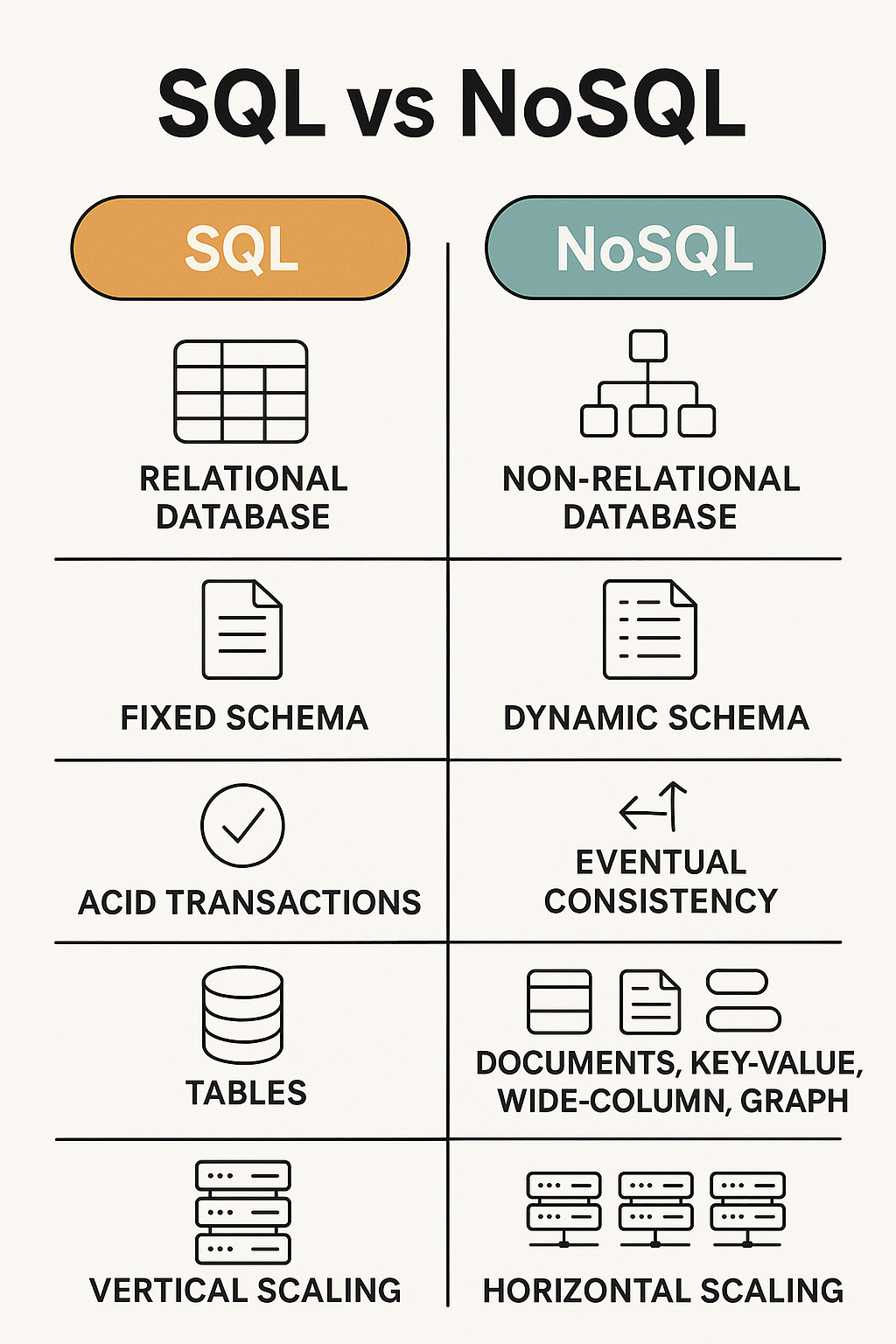
Types of Databases
Relational Databases
-
Data is organized in tables with rows and columns. Uses SQL (Structured Query Language) to manage data.
-
MySQL, PostgreSQL, SQL Server, and Oracle are examples of Relational Databases.
Why Relational Databases
- Structured Data and Relationships
Relational Databases are ideal for data that is well-structured and follows a defined schema.
Relationships between data can be defined using foreign keys, making it easier to manage complex data models.
- ACID Compliance
Most Relational Databases follow the ACID properties:
Atomicity – All parts of a transaction succeed or none at all.
Consistency – Data is always in a valid state.
Isolation – Transactions do not affect each other.
Durability – Once committed, transactions are permanent.
Ensures data integrity and reliability, which is critical for financial, healthcare, or enterprise applications.
- Powerful Query Language (SQL)
- SQL is a declarative language, meaning you describe what you want, not how to get it. Easy to perform complex queries, joins, aggregations, and data transformations.
- Security
Fine-grained access control and user permissions can be enforced.
Support for authentication and encryption of data.
- Standardization and Portability
SQL is a standardized language (ANSI SQL), so basic syntax works across different databases like MySQL, PostgreSQL, SQL Server, and Oracle.
Easier to switch vendors or integrate with other systems.
NoSQL Databases
-
Used for unstructured or semi-structured data. Stores data in formats like key-value pairs, documents, or graphs.
-
MongoDB, Cassandra, and Redis are examples of NoSQL databases.
Why NoSQL Databases
- Flexible Schema
No predefined schema, which means you can store data in different structures (JSON, Key-Value, Documents and Graphs).
Ideal for agile development where data requirements evolve over time.
- High Performance at Scale
Optimized for fast reads / writes, even with large volumes of data.
Many NoSQL databases use in-memory storage or optimized indexing.
- Horizontal Scalability
Built to scale out by distributing data across multiple nodes (Clustering and Sharding).
Easier to handle massive traffic and data loads than vertically scaled SQL systems.
- Designed for Distributed Systems
Many NoSQL systems are cloud-native and support geographically distributed data storage.
Helps with high availability, fault tolerance, and global app performance.
- Supports a Variety of Data Models
Choose the right type of NoSQL DB for your use case:
Document-based ie: MongoDB and Couchbase
Key-Value ie: Redis and DynamoDB
Column-Family ie: Cassandra and HBase
Graph-Based ie: Neo4j and Amazon Neptune
Big Data and Real-Time Use Cases
Excellent for use cases like:
IoT and telemetry
Real-time analytics
Event logging
Social media feeds
Recommendation engines
Schema-less and Developer Friendly
Store nested or complex objects without joins or normalization.
JSON / BSON documents map well to modern programming languages and REST APIs.
Eventual Consistency (CAP Theorem)
Many NoSQL DBs prioritize Availability and Partition Tolerance over Consistency.
This makes them more resilient in distributed environments, especially where perfect consistency isn't critical.
Relational Database for QA
-
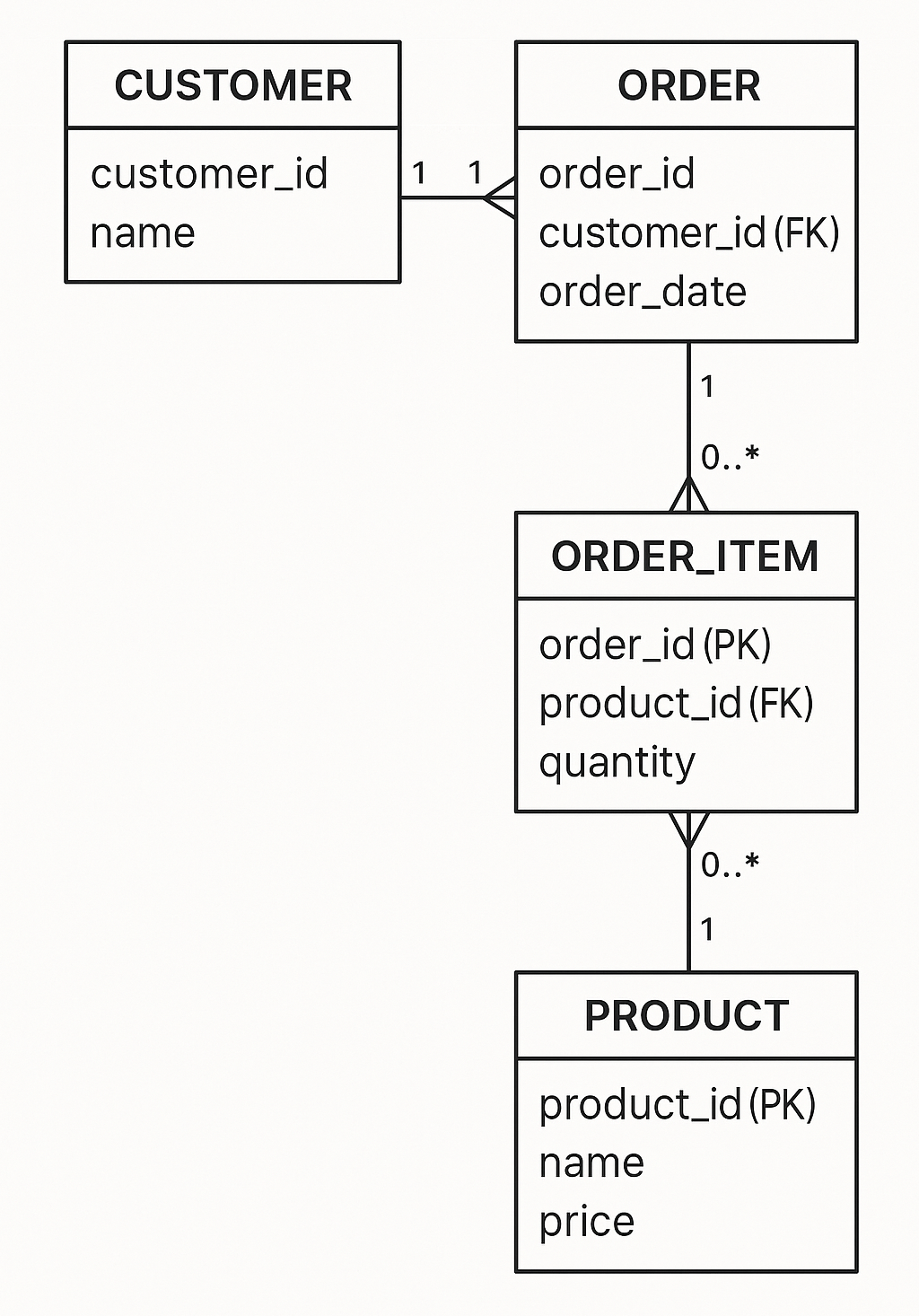
A Relational Database Management System (RDBMS) stores data in tables where each table has:
-
Rows (Records) - Each row represents a specific entry. ie: A user.
-
Columns (Fields) - Each column stores a specific type of data. ie: name, email.
-
Tables can be related to each other using keys, like:
-
Primary Key - A unique identifier for each row ie: user_id.
-
Foreign Key - A field that links a table to another table ie: order.user_id references user.user_id.
-
Example
users table
| user_id | name | |
|---|---|---|
| 1 | John | john@example.com |
| 2 | Alice | alice@example.com |
orders table
| order_id | user_id | product | amount |
|---|---|---|---|
| 101 | 1 | Laptop | 1200 |
| 102 | 2 | Smartphone | 800 |
Why QA Needs Database Knowledge
-
Data Validation - Check if data is correctly stored in the database after performing tests.
-
Test Automation - Use SQL queries to retrieve and validate test data.
-
Data Setup - Insert or modify test data directly in the database to create specific test scenarios.
-
Data Consistency - Ensure data integrity across multiple systems. ie: Frontend vs Backend.
-
Performance Testing - Analyze how queries and transactions perform under different loads.
Basics of SQL Scripting for QA
- SQL (Structured Query Language) is the language used to interact with relational databases.
Key SQL Operations
-
SELECT - Retrieve data from tables.
-
INSERT - Add new records to a table.
-
UPDATE - Modify existing data.
-
DELETE - Remove records.
-
JOIN - Combine data from multiple tables.
Basic SQL Queries for QA
- SELECT Query (Read Data) - The SELECT statement retrieves specific data from a table.
-- Get all rows and columns from the users table
SELECT * FROM users;

-- Retrieve specific fields with a filter
SELECT name, email FROM users WHERE user_id = 1;
- INSERT Query (Add Data) - The INSERT statement adds a new record into the table.
INSERT INTO users (user_id, name, email)
VALUES (3, 'Bob', 'bob@example.com');
- UPDATE Query (Modify Data) - The UPDATE statement modifies data in a table.
 -- Update email for user_id 1
UPDATE users
SET email = 'newemail@example.com'
WHERE user_id = 1;
- DELETE Query (Remove Data) - The DELETE statement removes records from a table.
 -- Remove the user with user_id 3
DELETE FROM users WHERE user_id = 3;
- JOIN Query (Combine Data from Multiple Tables) - JOIN is used to retrieve data from multiple related tables.
-- Retrieve user names and their corresponding orders
SELECT users.name, orders.product, orders.amount
FROM users
JOIN orders ON users.user_id = orders.user_id;
Intermediate SQL Queries for QA
-
Aliases and Functions (Enhance Queries)
-
Aliases simplify long table or column names.
-
SQL has built-in functions for calculations. ie: SUM() and COUNT().
-
-- Count the number of orders placed by each user
SELECT u.name AS UserName, COUNT(o.order_id) AS TotalOrders
FROM users u
JOIN orders o ON u.user_id = o.user_id
GROUP BY u.name;
-
Subqueries (Nested Queries)
- A subquery is a query within another query.
-- Retrieve the names of users who ordered a Laptop
SELECT name
FROM users
WHERE user_id IN (SELECT user_id FROM orders WHERE product = 'Laptop');
-
Transactions (Ensure Data Integrity)
- A transaction ensures that multiple SQL statements execute as a single unit.
-- If something fails, you can use ROLLBACK to undo the changes.
BEGIN TRANSACTION;
UPDATE users SET name = 'Alice Smith' WHERE user_id = 2;
INSERT INTO orders (order_id, user_id, product, amount) VALUES (103, 2, 'Tablet', 500);
COMMIT; -- Save changes
-
Indexes (Optimize Query Performance)
- Indexes speed up queries by creating a quick lookup on columns.
-- Create an index on the email column of the users table
CREATE INDEX idx_user_email ON users (email);
Using SQL in QA Automation
-
QA engineers can integrate SQL with test automation tools like Selenium, Cypress, or REST APIs to:
-
Retrieve expected values from a database and compare them with application responses.
-
Populate databases with data required for automated test cases.
-
Execute queries directly within automation frameworks using libraries (like JDBC for Java or PyODBC for Python).
-
Js code - Application code
const sqlLiteDB: SQLLiteDB = new SQLLiteDB();
const openResponse: any = await sqlLiteDB.open();
console.log(openResponse);

console.log("=========================");
console.log("= Select all records... =");
console.log("=========================");

// Get all the users by using SQL SELECT statement
const getMultiResponse: any = await sqlLiteDB.all("SELECT * FROM USERS");
Jest - Testing code
test("Select all users test", () => {
  // Compare with the result with what is expected
  expect(mainResult.getMultiResponse).toEqual(
    mainResultToCompare.getMultiResponse
  );
});
Common SQL Issues QA Should Check
-
Data Integrity - Ensure that no records are missing or duplicated.
-
Foreign Key Constraints - Validate relationships between tables.
-
Performance - Monitor slow queries or transactions.
-
Data Consistency - Ensure that application data matches backend data.
-
Security Issues - Verify that sensitive data (Passwords) is encrypted.
Module Review
Click to start the definition to term matching quiz
Click to start the multiple choice quiz
Score: : 0 / 20 [0.00 %]
Question 1 of 20: What is a database in the context of QA?