API Testing
- API testing ensures that Application Programming Interfaces (APIs) work as expected, focusing on verifying functionality, reliability, security, and performance. Let’s break down these key concepts and tools.
What is API Testing?
-
API testing involves testing the APIs directly (Without a user interface) to ensure they meet requirements in terms of:
-
Functionality - Do the endpoints return the expected response?
-
Performance - How fast does the API respond under load?
-
Security - Is the API protected from unauthorized access or attacks?
-
Reliability - Does the API respond consistently?
-
-
In contrast to front-end testing, which focuses on the graphical interface, API testing focuses on validating logic and data interactions between components or external systems.
Understanding API
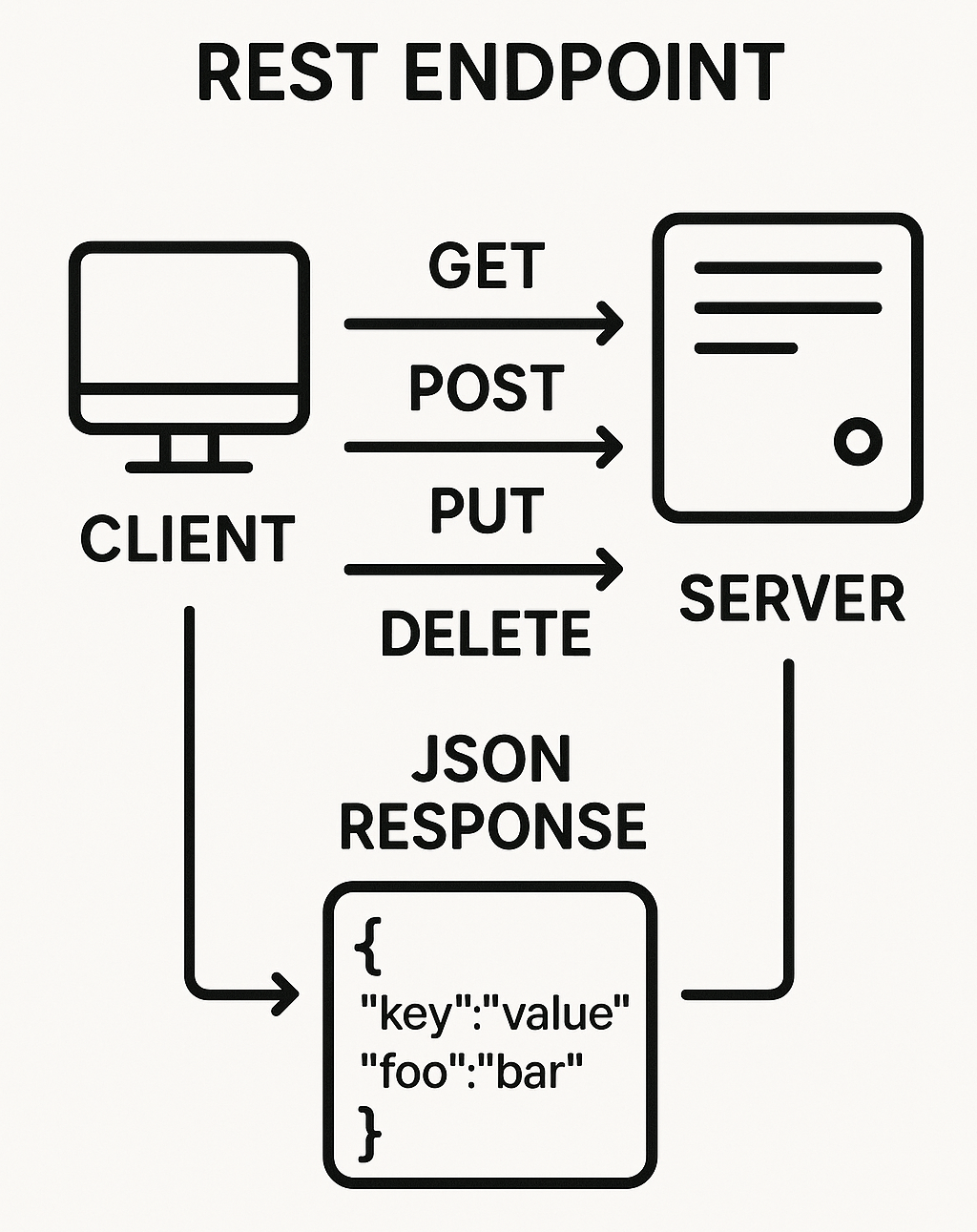
- An API (Application Programming Interface) allows two software systems to communicate. It defines rules for requesting and delivering data or operations between a client ie: Web app and a server ie: Backend system.
Key API Components
Endpoints
-
An API endpoint is a specific URL or URI (Uniform Resource Identifier) where an API (Application Programming Interface) can be accessed by a client to perform some operation. Think of it like a door into a system that lets you ask for data or tell it to do something.
-
Example - If you’re using a REST API for an blog, you might have these endpoints:
-
https://jsonplaceholder.typicode.com/posts - Get a list of all posts.
-
https://jsonplaceholder.typicode.com/posts/1 - Get details of a post with an id equal to 1.
-
HTTP Methods
- HTTP methods ie: Verbs define the type of action you want to perform on a resource via an API endpoint.
Common HTTP Methods
| Method | Description | Common Use |
|---|---|---|
| GET | Retrieves data from the server | Fetch a list of users, get product details. |
| POST | Sends new data to the server | Create a new user, submit a form. |
| PUT | Updates a resource completely | Replace an entire user profile. |
| PATCH | Updates part of a resource | Change just the email of a user. |
| DELETE | Removes a resource from the server | Delete a blog post or user. |
Complete list of HTTP Methods via MDN.
Request and Response
- Headers - Headers carry metadata about the request or response.
Request Headers
-
Authorization - Carries tokens like Bearer token for authentication.
-
Content-Type - Specifies the format of the body. ie: application/json.
-
Accept - Tells the server what type of response is expected. ie: application/json.
Response Headers
-
Content-Type - Format of the returned data.
-
Set-Cookie - Stores session or auth data.
-
Cache-Control - Tells clients how to cache the response.
Complete list of HTTP Headers via MDN.
Body
- The body contains data being sent or received, usually in JSON format.
Request Body
{
  "username": "john.smith",
  "email": "john.smith@example.com",
  "firstname": "John",
  "lastname": "Smith"
}
Response Body
{
  "userId": 1,
  "id": 1,
  "title": "Sunt aut facere repellat provident occaecati excepturi",
  "body": "Quia et suscipit recusandae consequuntur expedita et cum"
}
Status Codes
- These indicate the result of the request.
| Code | Meaning | Description |
|---|---|---|
| 200 | OK Success | Standard successful response. |
| 201 | Created | Success - A resource was created. ie: After a POST. |
| 204 | No Content | Success - Success but no content returned. |
| 400 | Bad Request | Client Error Invalid input from the client. |
| 401 | Unauthorized | Client Error Missing or invalid auth token. |
| 403 | Forbidden | Client Error You’re not allowed to access this. |
| 404 | Not Found | Client Error The endpoint or resource doesn’t exist. |
| 500 | Internal Server Error | Server Error Something went wrong on the server. |
Complete list of HTTP status codes via MDN.
SOAP vs REST
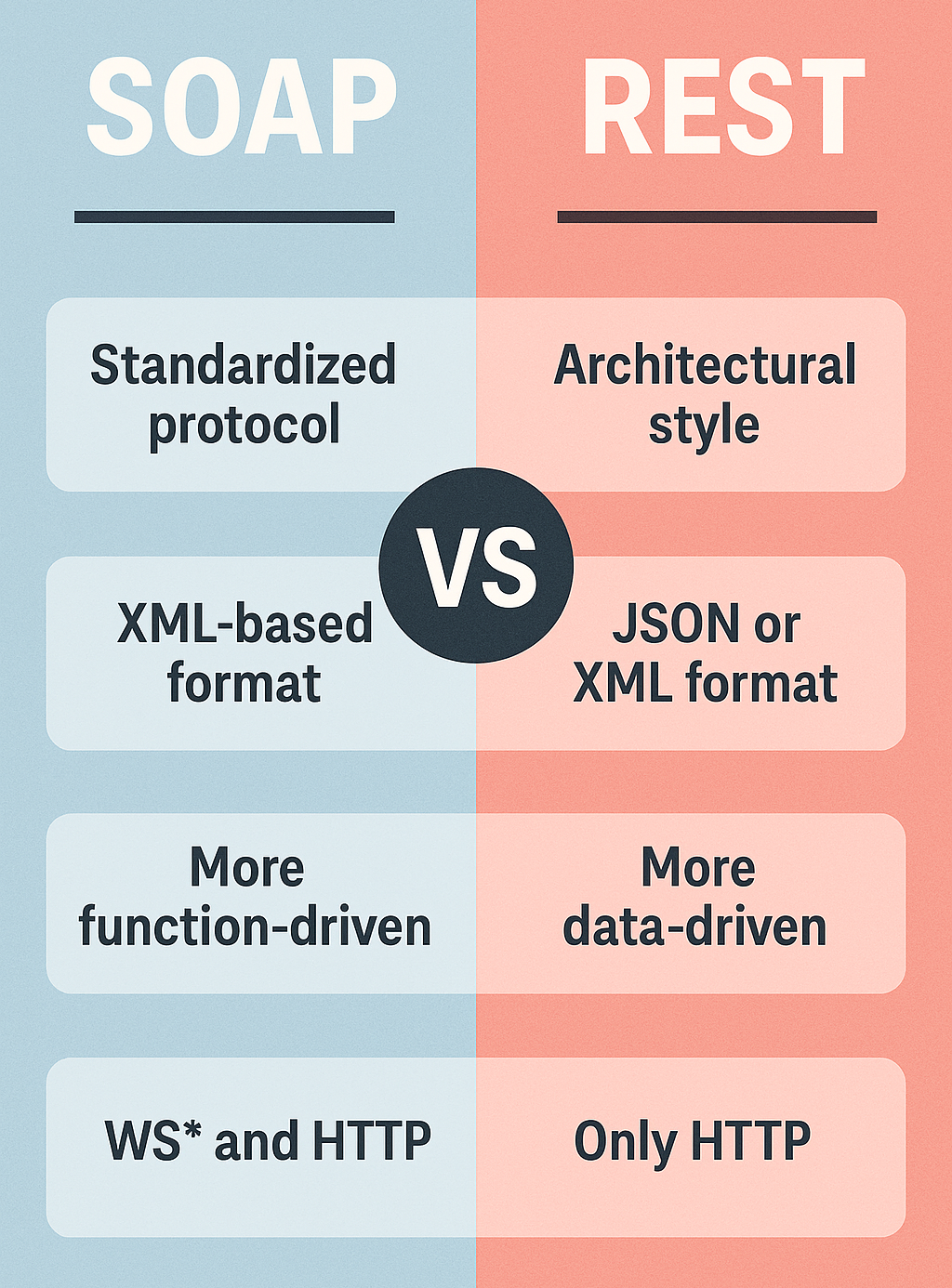
- Both SOAP (Simple Object Access Protocol) and REST (Representational State Transfer) are used for API communication, but they differ in structure and use cases.
SOAP
-
Protocol-based - Uses XML for both requests and responses.
-
Tightly coupled - Strongly enforces rules, contracts (WSDL).
- WSDL - - It’s an XML-based file that describes a SOAP web service—basically like an instruction manual for how to interact with that service.
-
More secure - Offers built-in support for security standards like WS-Security.
-
Latency - Slower and more resource-intensive.
-
Used in - Financial services, payment gateways, and legacy systems requiring strong reliability.
SOAP - Request
POST /WeatherService HTTP/1.1
Host: www.example.com
Content-Type: text/xml; charset=utf-8
SOAPAction: "http://example.com/GetWeather"

<soapenv:Envelope xmlns:soapenv="http://schemas.xmlsoap.org/soap/envelope/"
                  xmlns:wea="http://example.com/weather">
   <soapenv:Header/>
   <soapenv:Body>
      <wea:GetWeather>
         <wea:City>New York</wea:City>
      </wea:GetWeather>
   </soapenv:Body>
</soapenv:Envelope>
SOAP - Response
HTTP/1.1 200 OK
Content-Type: text/xml; charset=utf-8

<soapenv:Envelope xmlns:soapenv="http://schemas.xmlsoap.org/soap/envelope/"
                  xmlns:wea="http://example.com/weather">
   <soapenv:Body>
      <wea:GetWeatherResponse>
         <wea:City>New York</wea:City>
         <wea:Temperature>15°C</wea:Temperature>
         <wea:Condition>Sunny</wea:Condition>
      </wea:GetWeatherResponse>
   </soapenv:Body>
</soapenv:Envelope>
REST
-
Architectural style - Uses HTTP for communication.
-
Lightweight and fast - Typically uses JSON for data exchange.
-
Loosely coupled - No strict rules on how endpoints should behave.
-
Stateless - Each request contains all necessary information.
-
Used in - Modern web services, mobile apps, and microservices architecture.
Rest URL - https://jsonplaceholder.typicode.com:8080/posts/1
-
Url Scheme - https://
-
Server Hostname - jsonplaceholder.typicode.com
-
Port Number - :8080
-
Path - /posts
-
Parameter - /1
REST - Request
POST /tasks HTTP/1.1
Host: api.todoapp.com
Content-Type: application/json
Authorization: Bearer abc123xyz456

{
  "title": "Buy groceries",
  "dueDate": "2025-04-25",
  "completed": false
}
REST - Response
HTTP/1.1 201 Created
Content-Type: application/json

{
  "id": 101,
  "title": "Buy groceries",
  "dueDate": "2025-04-25",
  "completed": false,
  "createdAt": "2025-04-24T12:00:00Z"
}
Tools for API Testing
Postman
-
A popular API testing tool with a user-friendly interface.
-
Allows users to send requests, inspect responses, and automate tests.
-
Key features:
-
Create collections of requests.
-
Add pre-request scripts and test scripts using JavaScript.
-
Visualize and mock API responses.
-
Automate tests with Newman, Postman’s command-line tool.
-
-
Swagger (OpenAPI)
-
Swagger is a set of tools around the OpenAPI Specification (OAS). Used to design, document, and test APIs.
-
Swagger Tools:
-
Swagger UI - Generates interactive API documentation that lets developers try endpoints from the browser.
-
Swagger Editor - Provides a web-based editor to define APIs using YAML or JSON.
-
Swagger Codegen - Generates client or server code based on the API specification.
-
Swagger Example (YAML)
openapi: 3.0.0
info:
  title: Sample API
  version: 1.0.0
paths:
  /user:
    get:
    summary: Retrieve a user
    responses:
      "200":
      description: Successful response
Postman vs Swagger
| Feature | Postman | Swagger |
|---|---|---|
| Purpose | Testing APIs | Designing and documenting APIs. |
| Format | Works with API requests and responses | Works with API specifications (YAML). |
| Collaboration | Good for developers and testers | Useful for API designers. |
| Automation | Supports automated tests with Newman | Can generate client / server code. |
Module Review
Click to start the definition to term matching quiz
Click to start the multiple choice quiz
Score: : 0 / 33 [0.00 %]
Question 1 of 33: What does HTTP status code 400 represent?